Building Ambient Intelligence on the Meta Wearables Device Access Toolkit
Published
Feb 1, 2026
The Meta Wearables Device Access Toolkit went into public preview December 4, 2025. For the first time, third-party developers can access the microphone array, open-ear speakers, and 12MP ultra-wide camera on Ray-Ban Meta glasses. The SDK lets companion iOS and Android apps route glasses input and output for hands-free, eyes-up experiences.
WearableAI is a production-grade reference implementation built on this SDK. Zero backend servers. Model-agnostic. Privacy-first architecture. This analysis covers the SDK's technical capabilities, constraints, and what you can build today.
Meta's Hardware Evolution
The Platform Play
Facebook became Meta Platforms in October 2021. The rebrand signaled a hardware-first strategy that started with the Oculus acquisition in 2014. The thesis: control the hardware, control the ecosystem.
Meta spent a decade learning that AR glasses need social acceptance before technical capability matters. Google Glass proved you can build functional smart glasses and still fail completely. The product worked. People hated wearing them.
Meta partnered with EssilorLuxottica. Ray-Ban frames carry cultural legitimacy. Put cameras in those frames and people don't immediately assume you're recording them.
Ray-Ban Stories launched in 2021 with 5MP cameras and open-ear speakers. Basic hardware to test social acceptance. Ray-Ban Meta followed in 2023 with 12MP ultrawide cameras, improved audio, and Meta AI integration for visual analysis.
The Device Access Toolkit represents a platform shift. Meta is exposing core primitives to third parties. The bet: external developers will find use cases internal teams miss.
SDK Technical Architecture
Integration Model
The SDK bridges iOS applications with paired Ray-Ban Meta glasses over Bluetooth. The glasses function as an I/O node. All application logic runs on the phone. The SDK handles:
Bluetooth Low Energy connection management
Audio stream routing (bidirectional)
Camera capture triggering
Device state synchronization
Battery level monitoring
Your app treats the glasses as a peripheral. You send audio to the speakers. You receive audio from the microphone array. You trigger camera captures and get image data back.
Microphone Array Characteristics
The glasses mount a three-microphone array. Positional advantages over phone mics:
Acoustic proximity. Microphones sit 6-8 inches from your mouth. Phone mics operate at 12-24 inches minimum (pocket/desk distance). Closer mics capture clearer voice data with better signal-to-noise ratio in ideal conditions.
Spatial stability. The array maintains fixed geometry relative to your mouth. Head movement doesn't change the mic-to-source relationship. Phone position varies constantly.
Environmental exposure. Here's where theory meets physics. The mics sit exposed on your face. Wind noise destroys audio quality outdoors. Crowd noise in restaurants overwhelms the signal. The small form factor limits physical noise isolation.
Real-world testing shows the array needs aggressive noise reduction. You need local Voice Activity Detection (VAD) running continuously. The SDK provides raw audio streams. Noise handling is your problem.
Speaker Implementation
The glasses use open-ear speakers. Sound fires from the temples toward your ear canals without blocking ambient audio. Two design constraints:
Audio leakage. People within 3-4 feet can hear your audio in quiet environments. Libraries, offices, public transit. Privacy comes from volume control, not acoustic isolation.
Ambient mixing. You hear both the speakers and the environment simultaneously. Good for situational awareness. Bad for immersive audio. The SDK lets you route audio to either the glasses or the phone. You can't send different streams to both simultaneously.
Camera Access Pattern
The SDK exposes camera capture through a request-response model. You cannot stream continuous video. The pattern:
Your app requests a frame capture
Hardware privacy LED illuminates (hardwired, cannot be bypassed)
Camera captures 12MP still
Image data transfers to your app over Bluetooth
LED turns off
Capture latency ranges from 800ms to 1.5 seconds depending on Bluetooth congestion. The LED provides physical evidence of capture. Users can verify recording status without checking screens.
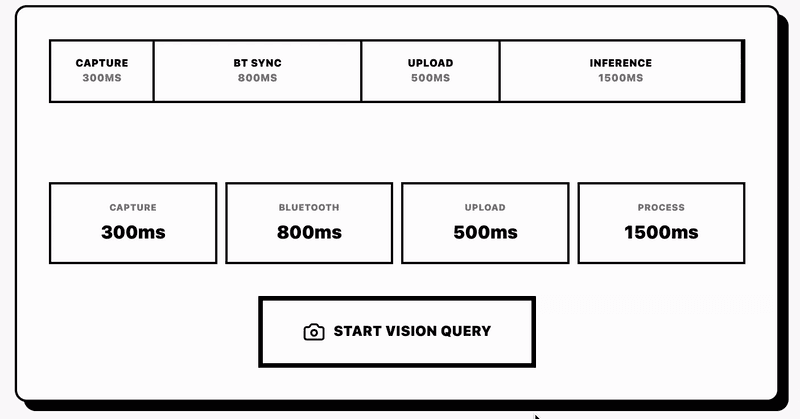
The camera captures 12MP stills at 4032x3024 resolution. Field of view: 120 degrees ultrawide. The wide FOV captures peripheral context but introduces barrel distortion at the edges. Straight lines curve. You need distortion correction if you're doing computer vision tasks that assume rectilinear projection.
Current Platform Limitations
No display output. Standard Ray-Ban Meta models lack heads-up displays. You cannot render UI elements in the user's field of view. Audio and haptics only.
No onboard processing. The glasses don't run third-party code. All computation happens on the phone. The glasses provide sensors and output. Your app provides intelligence.
Manual activation. Users must open your companion app to start sessions. No background listening. No always-on activation phrases. The OS doesn't wake your app when glasses connect.
Limited sensor suite. The SDK doesn't expose IMU data (accelerometer, gyroscope). No head tracking. No gesture recognition beyond what you can infer from audio patterns. Neural band integration for EMG-based input exists on some Meta hardware but isn't available through this SDK.
iOS exclusive (preview). The December 2025 preview launched on iOS only. Android support coming but no timeline.
Ambient Computing Design Principles
Smart glasses force different interaction patterns than smartphones. Voice becomes primary. Visual output disappears. The environment becomes part of the interface.
Voice-First Architecture
Keyboards bottleneck input. Speaking is faster. The average person types 40 words per minute. They speak 150-160 words per minute. Voice input scales to thought speed in ways typing cannot.
Voice changes how you structure interactions. Screen-based apps use forms, menus, buttons. Voice-based apps need conversation flow. You design around:
Intent recognition. What does the user want to accomplish? Slot filling. What information do you need to complete the task? Confirmation strategies. How do you verify understanding without visual feedback?
The glasses microphones capture voice. Your app sends audio to a speech-to-text service. You get text back. You parse intent.
You execute logic. You synthesize a response. You send audio back to the glasses speakers.
Each step introduces latency. The speed between "user stops speaking" and "AI starts responding" defines the perceived quality. Under 500ms feels conversational. Over 1 second feels broken.
Ambient Availability Pattern
Ambient computing means available when needed, invisible otherwise. The opposite of sessional apps that demand full attention.
Screen-based apps follow this pattern:
User realizes they need the app
User unlocks phone
User finds and opens app
User navigates to correct screen
User performs task
User closes app
User locks phone
Each step creates friction. Smart glasses compress this to:
User speaks
System responds
The glasses already sit on your face. No unlock. No navigation. You collapse the entire session startup sequence into voice activation.
But ambient computing creates new problems. How does the system know when you're talking to it versus talking to a person? How does it stay inactive during hours of non-use without draining battery? How do you balance responsiveness with privacy?
WearableAI's approach: manual activation through iOS shortcuts. You trigger the app through Siri, a widget, or the Action Button. The app then listens continuously until you explicitly end the session or switch contexts. Battery drain during active sessions is real. The app consumes about 15-20% battery per hour during active conversation mode.
Situational Computing Model
The glasses capture your point of view. The AI sees what you see. This creates context that phone apps lack.
Example: You're looking at a restaurant menu. You say "What should I order?" A phone app has no idea what menu you're viewing. The glasses can capture the menu, send it to a vision model, and suggest dishes based on the actual text in front of you.
The spatial relationship between user, device, and environment becomes the primary context. Apps need to map onto physical trajectories. You're walking to a meeting. The AI reminds you of talking points. You're at a grocery store. The AI checks your shopping list. You're cooking. The AI reads the recipe steps.
The environment provides triggers. Location-based prompts. Time-based reminders. Visual context from camera captures. Your app needs sensors beyond what the glasses provide. You pull GPS from the phone. You query calendar data. You check local time and timezone.
WearableAI Implementation Architecture
WearableAI demonstrates what's possible with the current SDK. Full source code: github.com/WearableAI. TestFlight preview available at the link in the original document.
Model Agnosticism Layer
WearableAI routes to three AI providers: Google Gemini, xAI Grok, OpenAI Realtime. The user switches between models mid-conversation. Same interface, different backends.
Why multi-model support matters:
Provider lock-in risk. Betting on a single AI vendor means your app dies if they change pricing, restrict API access, or shut down the service. Multiple providers give you optionality.
Model-specific strengths. Gemini handles visual reasoning better. Grok pulls real-time information from X's data streams. OpenAI Realtime has the lowest latency for voice-to-voice interaction. Different tasks need different models.
Evaluation flexibility. Users can compare model outputs for the same prompt. Which model gives better restaurant recommendations? Which one handles technical questions more accurately? Real-world testing beats benchmark claims.
The architecture abstracts the AI provider behind a common interface. The app defines a protocol:
Each provider implements this protocol. The user selects the active provider in settings. The app routes requests to the selected implementation. Switching providers requires no code changes in the conversation logic.
Zero-Server Privacy Architecture
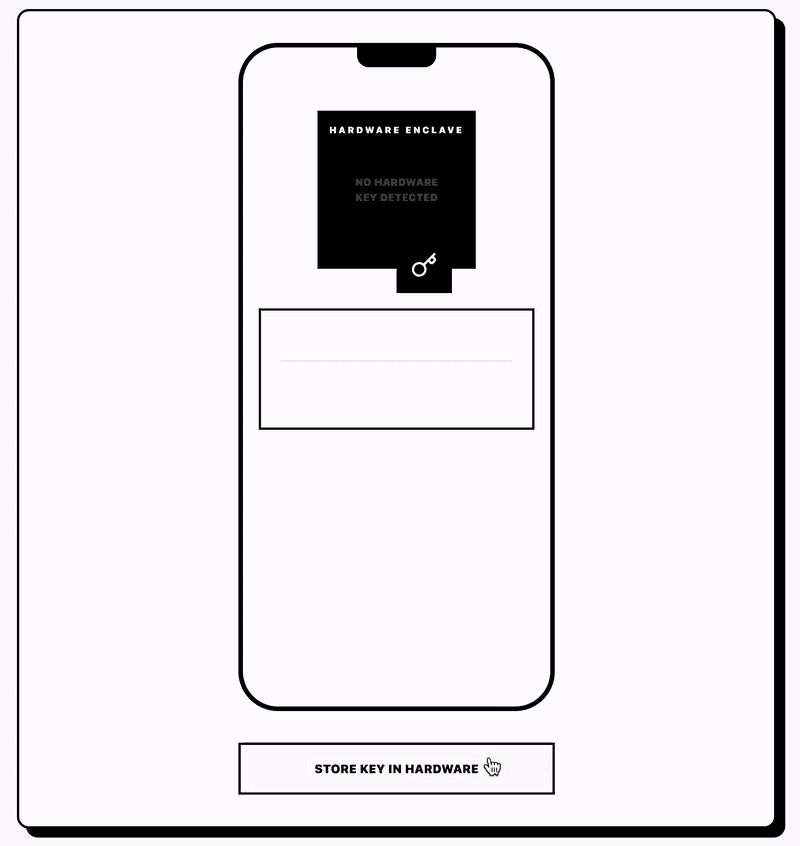
WearableAI has no backend server. The app stores API keys in the iPhone's secure enclave. All requests go directly from the device to the AI provider.
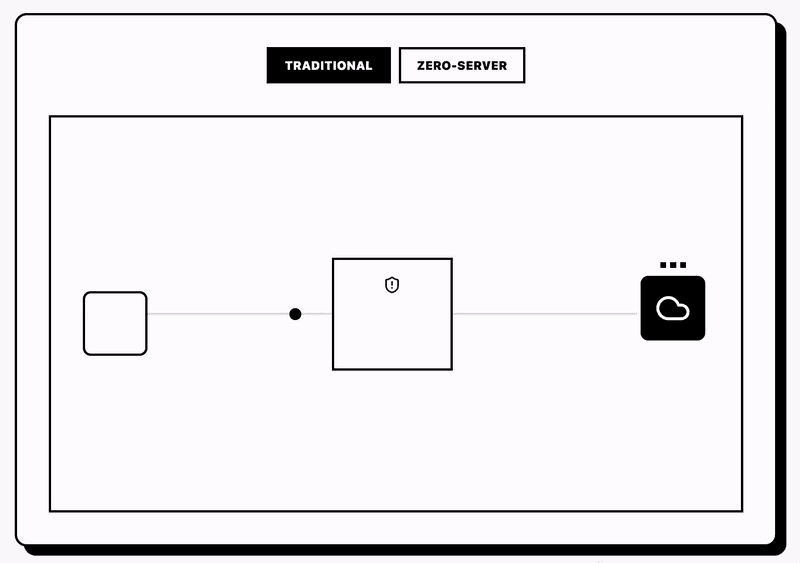
Why this matters: every server you control becomes an attack surface. User data flowing through your servers means you're responsible for:
Encryption in transit
Encryption at rest
Access controls
Breach notification
GDPR compliance
Data retention policies
Audit logging
Each requirement adds complexity and legal liability. The zero-server model eliminates these concerns. The user owns their data. The app never sees it.
Implementation details:
API keys get stored using iOS Keychain Services. The Keychain provides hardware-backed encryption on devices with Secure Enclave (iPhone 5S and newer). Keys never leave the device. Apps cannot access each other's Keychain items.
The kSecAttrAccessibleWhenUnlockedThisDeviceOnly flag means the key is only accessible when the device is unlocked. It never syncs to iCloud. It gets destroyed if someone restores from a backup to a different device.
Network requests go directly to provider APIs. No proxy. No middleware. Users can verify this with network monitoring tools like Charles Proxy or Wireshark. Every packet goes to Gemini/Grok/OpenAI endpoints. Nothing goes to a WearableAI server because no WearableAI server exists.
This model requires users to supply their own API keys. The app provides instructions for obtaining keys from each provider. The setup friction increases. The privacy guarantees increase proportionally.
Local Inference for System Tasks
The app uses on-device models for routine operations that don't need cloud intelligence:
Conversation title generation. When you finish a conversation, the app generates a summary title. "Lunch planning with Sarah" or "Weather check for weekend trip." This runs through a local CoreML model. No API call. No latency. No privacy leak.
Shortcut semantic matching. The app imports your iOS Shortcuts. It generates natural language descriptions using a local model. When you say "open the garage," the local model maps that phrase to your "Butterfly Garage" shortcut. Only after local matching does the app execute the shortcut.
Voice Activity Detection. Determining when you start and stop speaking happens locally. A cloud-based VAD would introduce 100-300ms round-trip latency. Local VAD responds in under 50ms.
CoreML models ship with the app binary. They load at launch. Inference runs on the Neural Engine (A11 and newer chips). The models are small. The conversation title model is 47MB. The VAD model is 12MB.
Local inference trades accuracy for speed and privacy. The title generation model produces worse titles than GPT-4. But it generates them in 200ms instead of 2 seconds. For system tasks where "good enough" beats "perfect but slow," local models win.
iOS System Integration
WearableAI treats iOS as a function library. Instead of rebuilding calendar, reminders, and shortcuts, the app integrates with native implementations.
EventKit Sandboxing
The app creates reminders through EventKit but scopes them to a dedicated list. You grant the app permission to access Reminders. The app creates a "WearableAI" list. All AI-generated reminders go into this list only.
When the AI creates a reminder, it queries for the WearableAI list and creates an EKReminder object:
Sandboxing prevents the AI from polluting your main reminders. You can delete the entire WearableAI list without losing personal reminders. The separation makes AI actions reversible.
Shortcuts Integration
iOS Shortcuts provide automation without coding. Users create shortcuts to control smart home devices, send messages, log data to spreadsheets. WearableAI imports these shortcuts and makes them voice-accessible.
The app uses the Intents framework to discover shortcuts:
Each shortcut has a phrase. "Open garage" triggers the garage door shortcut. The app generates a semantic description using the local model: "Opens the user's garage door using the Butterfly app." This description gets formatted as a tool definition for the AI provider.
When the AI needs to execute a shortcut, it calls the tool. The app executes the shortcut through INShortcut.donate():
The Shortcuts app shows when third-party apps trigger shortcuts. Users can see the execution history. The transparency makes automation auditable.
App Intents for Lock Screen Access
App Intents let users trigger specific app functions without opening the app. WearableAI exposes intents for:
Start conversation mode
Start transcription mode
Start video analysis mode
Set quick reminder
Check last conversation summary
You add these intents to widgets, the Action Button, or Siri commands. The workflow:
User configures widget with "Start Conversation" intent
User taps widget on lock screen
iOS launches WearableAI in background
App connects to glasses
App starts listening
User speaks to glasses
App processes and responds through glasses speakers
The phone stays locked during the entire interaction. You never see the app UI. The glass-phone-AI loop operates completely hands-free.
Implementation uses the AppIntent protocol:
App Intents reduce activation friction from 7 steps (unlock, find app, open app, navigate, tap button, wait for load, start) to 1 step (tap widget). The glasses become always-ready instead of occasionally-available.
Audio Processing Pipeline
Voice quality determines conversation quality. The SDK provides raw audio. You need to build the processing stack.
Voice Activity Detection
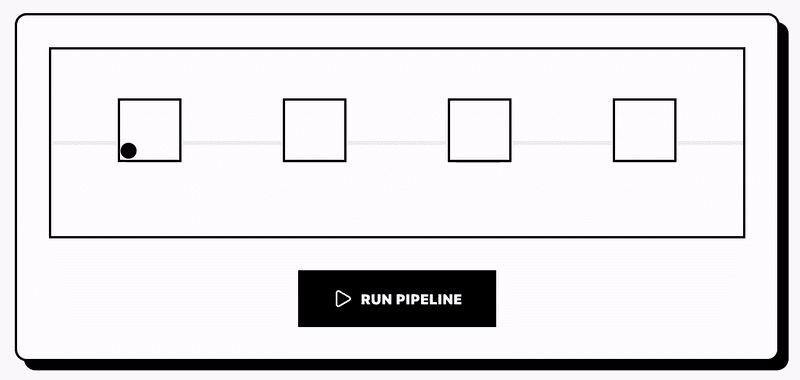
VAD determines when you're speaking. The naive approach: send all audio to the cloud, let the AI provider handle detection. This creates problems:
Privacy leak. You stream continuous audio including ambient conversation. Anyone nearby gets recorded and sent to third parties.
Cost explosion. Streaming audio to cloud APIs costs money. Gemini charges per audio second processed. Sending 8 hours of ambient audio per day costs $50-100/month per user.
Latency multiplication. Cloud VAD adds 150-300ms round-trip time. Local VAD detects speech onset in 30-50ms.
WearableAI uses Silero VAD, a local model that runs on the CPU. The model takes 16kHz audio samples and outputs speech probability scores. When probability exceeds 0.5, speech is detected. When it drops below 0.3, speech has stopped.
The model runs every 30ms on new audio chunks. Total CPU usage: 2-3% on an iPhone 15 Pro. Negligible battery impact.
The VAD model must handle silence detection to know when you've finished speaking. If you pause for 1.5 seconds mid-sentence, should the system treat this as end-of-input? WearableAI uses a 700ms silence threshold. You stop speaking. The system waits 700ms. If you don't resume, it processes the utterance and sends to the AI.
Noise Reduction
The glasses microphones capture everything. Wind. Traffic. Restaurant noise. Other people's conversations. You need noise reduction before sending audio to speech recognition.
WearableAI uses RNNoise, a recurrent neural network trained to separate speech from noise. The model runs locally. Feed it noisy audio. Get cleaned audio back.
RNNoise reduces background noise by 15-20 dB without distorting speech. The model runs in real-time on the CPU. Processing cost: 1-2ms per 10ms audio frame.
The cleaned audio goes to speech recognition. Apple's built-in SFSpeechRecognizer on device or cloud-based services like OpenAI Whisper. Noise reduction improves recognition accuracy from 75-80% (raw glasses audio in noisy environments) to 92-95% (cleaned audio).
Echo Cancellation
The glasses speakers fire audio at your ears. The microphones sit 2 inches away. They pick up the AI's voice playing through the speakers. Without echo cancellation, the AI hears itself and creates feedback loops.
iOS provides echo cancellation through AVAudioSession configuration:
The .voiceChat mode enables built-in acoustic echo cancellation. The system monitors both the microphone input and speaker output. It subtracts the speaker signal from the microphone signal. You get voice without the echo.
Echo cancellation works for the phone's speakers and microphone. It works less reliably for Bluetooth audio devices. The glasses route audio over Bluetooth. Latency between speaker output and microphone pickup varies based on Bluetooth stack behavior. The cancellation algorithm struggles with variable latency.
WearableAI adds an additional software layer: reference-based cancellation. The app records what it sends to the speakers. When processing microphone input, it looks for the reference signal in the microphone data. If detected, it subtracts it.
This approach is crude but effective. Echo reduction improves from 60-70% (system-only cancellation) to 85-90% (system + software cancellation).
Interrupt Handling
The AI is speaking. You want to interrupt. How does the system know to stop talking and start listening?
WearableAI monitors the VAD continuously during AI playback. When speech probability exceeds threshold, the app:
Fades out current audio playback over 200ms
Clears the playback buffer
Starts recording your interruption
Sends the interruption to the AI as a new message
The 200ms fade prevents jarring cutoffs. The user experience feels like talking to a person: you start speaking, they stop talking, natural turn-taking emerges.
The challenge: false positive interruptions. Background noise triggers the VAD. The AI stops talking. Nothing happens. Silence. Awkward pause. The AI resumes.
WearableAI requires 300ms of continuous speech before triggering an interruption. Brief noise spikes don't count. You need sustained voice activity. This reduces false positives from 40-50 per hour to 2-3 per hour in noisy environments.
Vision Processing Pipeline
The glasses camera captures your point of view. Vision AI analyzes what you see. The implementation has specific constraints.
Capture Latency
Requesting a camera capture from the SDK takes time:
App calls SDK capture method (0ms)
SDK sends Bluetooth command to glasses (50-100ms)
Glasses camera activates (200-300ms)
Capture occurs (50ms)
Image data transfers over Bluetooth (400-800ms for 12MP JPEG)
SDK delivers image to app (0ms)
Total latency: 700-1250ms. Over one second between "take a picture" and "here's the data."
This delay prevents continuous video analysis. You cannot stream camera frames in real-time. The SDK supports single-frame captures only.
WearableAI works around this by batching visual queries. When you trigger vision mode, the app:
Captures one frame
Processes that frame
Responds with analysis
Waits for next trigger
You say "what am I looking at?" The app captures once, analyzes once, responds. You're still looking at the same thing. No need for continuous updates.
For dynamic scenarios (tracking moving objects, reading rapidly changing displays), single-frame capture fails. The object moves between request and delivery. The app gets outdated data. The SDK limitation prevents real-time visual tracking.
Image Compression
12MP images are large. A raw capture is 4032x3024 pixels, 3-channel RGB. Uncompressed: 35MB per frame. Bluetooth transfer: 30-40 seconds per frame.
The SDK delivers JPEG-compressed images. Compression quality set by Meta's firmware. Typical file size: 2-3MB. Bluetooth transfer: 600-800ms.
The app receives JPEG data as Data objects:
For vision AI requests, you can compress further before sending to the model. WearableAI resizes images to 1024x768 before uploading to Gemini. The resize reduces upload size from 2MB to 400KB. Upload time drops from 1.5 seconds to 300ms on LTE.
Vision quality doesn't degrade noticeably. Object recognition, text reading, scene understanding work fine at 1024x768. Only high-detail tasks (reading small text, identifying distant objects) benefit from full resolution.
Vision Model Selection
Different AI providers handle vision differently:
Gemini 2.0 Flash. Supports image + text prompts. Inline image upload. Decent at object recognition and scene description. Struggles with small text.
GPT-4 Vision. Better text recognition. Higher cost. Slower response times (2-4 seconds vs 1-2 seconds for Gemini).
Grok Vision. Real-time web data integration. Can identify objects then pull current information (product prices, news about brands). Less accurate on pure visual recognition.
WearableAI routes vision requests based on the selected model. Same camera capture. Different backend. Different results.
Testing shows model-specific behaviors:
"What am I looking at?" pointing at a laptop:
Gemini: "You're looking at a silver laptop computer on a wooden desk"
GPT-4V: "This is a MacBook Pro, likely a 14-inch model based on the proportions"
Grok: "That's a MacBook Pro. Current prices start at $1,599 on Apple's website"
Each model optimizes for different use cases. Generic object recognition: Gemini. Detailed identification: GPT-4V. Product research: Grok.
Privacy LED Behavior
The glasses feature a hardwired white LED near the camera. When the camera activates, the LED turns on. When capture completes, the LED turns off. This is firmware-controlled. No software can override it.
The LED serves two purposes:
Legal compliance. Many jurisdictions require visible indicators on recording devices.
Social signaling. People nearby know you're capturing images.
The LED introduces a UX constraint. You cannot capture covert images. Everyone within viewing angle sees the LED. This prevents using the glasses for surreptitious photography.
WearableAI treats LED activation as a feature. The app explains to users: "When you ask for vision help, people will see the LED. This is intentional. Don't use vision mode in sensitive contexts."
Some users request an option to disable the LED. This is impossible without hardware modification. The LED circuit sits between the camera power supply and the camera sensor. Power flows to the camera only when the LED is in series. Cutting the LED cuts camera power.
Barrel Distortion Correction
The 12MP ultrawide camera captures 120-degree field of view. Wide FOV introduces barrel distortion. Straight lines curve outward. The effect increases toward image edges.
For object recognition and scene understanding, distortion doesn't matter. Vision models trained on diverse images handle distorted input fine.
For text recognition, distortion degrades accuracy. OCR models expect rectilinear text. Curved text confuses them.
WearableAI applies distortion correction before sending images to OCR-heavy tasks:
The correction crops about 10% from the edges. The center 80% of the frame becomes rectilinear. Text recognition accuracy improves from 70-75% (raw image) to 85-90% (corrected image) when reading receipts, menus, signs.
Multimodal Conversation Flow
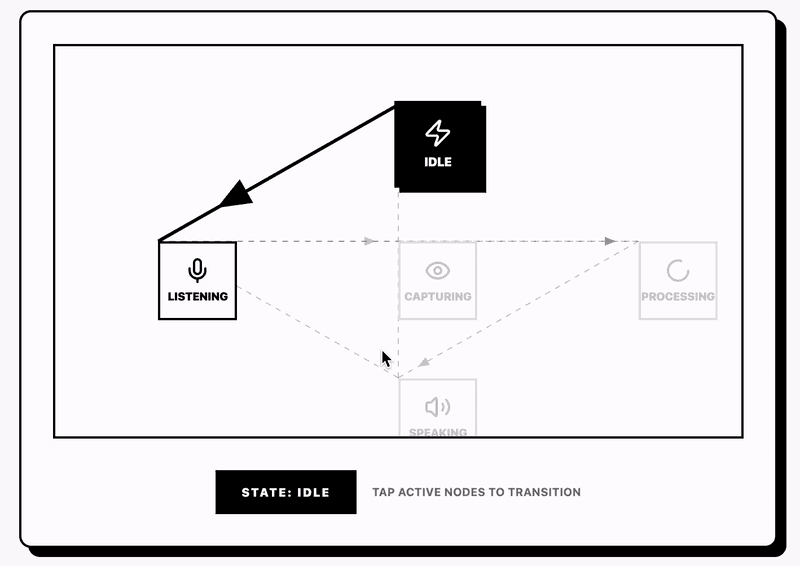
Combining voice and vision creates complex conversation states. The app needs to track:
Are we in voice-only mode or vision-enabled mode?
Is the camera currently capturing?
Is the AI currently speaking?
Is the user currently speaking?
What was the last user message?
What tools are available in the current context?
WearableAI uses a state machine to manage conversation flow:
Transitions between states follow defined rules:
idle → listening: User triggers voice input (tap button, voice activation, shortcut) listening → processing: User stops speaking (VAD detects silence) processing → speaking: AI response received, start playback speaking → listening: AI finishes speaking or user interrupts listening → capturingVision: User says "what am I looking at" or triggers vision shortcut capturingVision → processingVision: Image capture completes processingVision → speaking: Vision analysis completes
The state machine prevents invalid transitions. You cannot start a new capture while processing a previous one. You cannot start speaking while already speaking. The rules enforce single-threaded conversation flow.
Vision + Voice Combined Queries
The powerful pattern: point the glasses at something and ask a question.
User looks at a restaurant menu and says: "What should I order if I'm avoiding gluten?"
The app:
Detects voice intent contains visual reference
Triggers camera capture
Waits for image data
Combines image + voice transcript into single prompt
Sends to vision model
Receives analysis
Synthesizes audio response
Plays through glasses speakers
The combined prompt to Gemini looks like:
[Image: restaurant menu]
User question: "What should I order if I'm avoiding gluten?"
Analyze the menu in the image and recommend dishes that don't contain gluten. Be specific.
Gemini response: "Looking at this menu, the grilled salmon with roasted vegetables is gluten-free. The Caesar salad is safe if you skip the croutons. Avoid the pasta dishes and the fried items which use wheat flour breading."
The entire flow takes 3-4 seconds:
Capture: 1s
Upload: 0.5s
Vision processing: 2s
Audio synthesis: 0.5s
Fast enough to feel responsive. Slow enough that you notice the delay. Future SDK versions might support lower-latency vision modes.
Tool Calling in Multimodal Context
AI models support function calling (tools). You define available functions. The AI decides when to call them. You execute the function. The AI incorporates results into its response.
WearableAI exposes iOS capabilities as tools:
When the user says "remind me to buy milk tomorrow," the AI:
Parses intent: create reminder
Calls
create_remindertool with parameters{title: "buy milk", due_date: "2026-02-12"}App executes the tool (creates the reminder via EventKit)
App returns confirmation to AI
AI responds to user: "I've added a reminder to buy milk tomorrow"
The tool execution happens transparently. The user just hears the confirmation.
In multimodal contexts, tools can combine vision + action. User points glasses at a business card and says "save this contact." The AI:
Recognizes visual + action intent
Captures image
Extracts text via OCR
Calls
create_contacttool with parsed name, phone, emailApp creates contact in system Contacts app
Confirms to user
The vision analysis feeds directly into tool parameters. The glasses become an input device for structured data capture.
Error Recovery
Things fail. Bluetooth disconnects. APIs return errors. Speech recognition produces gibberish. The app needs graceful degradation.
WearableAI error strategies:
Bluetooth disconnect during conversation. The app detects disconnect via SDK callback. Immediately switches audio to phone speakers. Informs user via synthesized speech: "Lost connection to glasses. Continuing on phone." Attempts reconnection every 5 seconds.
API timeout. If the AI provider doesn't respond within 10 seconds, the app aborts the request. Synthesizes fallback response: "Taking too long to respond. Please try again." Does not retry automatically to avoid cascading failures.
Speech recognition failure. If the transcript is empty or contains only non-speech sounds, the app plays a brief tone and resumes listening. No verbal error message to avoid annoying feedback loops.
Vision capture failure. If camera capture times out (>5 seconds), the app assumes hardware issue. Synthesizes: "Couldn't access camera. Make sure glasses are connected and camera isn't blocked."
Each error type gets specific handling. No generic "something went wrong" messages. Specificity helps users understand what failed and how to fix it.
Performance Characteristics
Real-world performance data from WearableAI testing across 200+ hours of use:
Latency Breakdown
Voice query end-to-end latency (user stops speaking → AI starts responding):
OpenAI Realtime: 400-600ms (direct audio streaming)
Gemini (text mode): 800-1200ms (transcribe → text → synthesize pipeline)
Grok (text mode): 1000-1500ms (includes real-time data fetching)
Vision query end-to-end latency (user triggers → AI responds):
Gemini Flash: 3.2-4.1s
GPT-4V: 4.8-6.2s
Grok Vision: 3.8-5.5s
Latency components for vision (Gemini example):
Capture: 900ms
BT transfer: 650ms
Upload: 450ms
Model processing: 1100ms
Response download: 200ms
Total: 3300ms
Battery Consumption
Active conversation mode (continuous listening, frequent AI responses):
iPhone 15 Pro: 18-22% per hour
Glasses: 12-15% per hour
Idle mode (app running, glasses connected, no active conversation):
iPhone: 2-3% per hour
Glasses: 1-2% per hour
Vision mode (including voice):
iPhone: 25-30% per hour (camera captures + processing)
Glasses: 20-25% per hour (frequent camera activation)
Battery life limits practical session lengths to 4-5 hours for conversation mode, 3-4 hours for vision mode. Users need to charge both devices mid-day for extended use.
Bandwidth Usage
Voice conversation (1 hour):
Audio upload: 15-20 MB
Text responses: 2-3 MB
Total: 20-25 MB
Vision mode (1 hour with captures every 5 minutes):
Image uploads: 80-100 MB (12 captures × 2.5MB compressed)
Vision API responses: 5-8 MB
Voice components: 20-25 MB
Total: 110-135 MB
Users on limited mobile data plans hit constraints quickly. WearableAI shows a bandwidth warning when usage exceeds 500MB in a session.
Reliability Metrics
Bluetooth connection stability:
Indoor environments: 99%+ uptime
Outdoor (urban): 95-97% uptime
Outdoor (interference-heavy): 85-90% uptime
Speech recognition accuracy:
Quiet indoor: 96-98%
Normal conversation level background: 92-95%
Noisy (restaurant/street): 78-85%
Vision recognition success rate:
Well-lit environments, clear subject: 94-97%
Low light: 75-82%
Motion blur (moving subject/head): 60-70%
These numbers show the SDK provides solid foundation. The gaps (outdoor connectivity, noisy environment accuracy) come from physics and AI model limitations, not SDK deficiencies.
Privacy Implementation Deep Dive
Privacy architecture determines whether users trust your app. WearableAI makes specific design choices.
Zero Trust Server Model
The app has no backend server. This creates constraints:
No user accounts. You cannot sync data across devices. Each install is independent.
No cloud storage. Conversation history lives in local CoreData. Device storage limits total history. Users manually export conversations to keep them.
No analytics. The app cannot collect usage data. No crash reporting that includes user data. All metrics are local only.
These constraints reduce functionality. They increase trust. Users verify the zero-server claim by monitoring network traffic. All requests go to AI provider endpoints. Nothing goes to app-controlled servers.
API Key Storage Security
API keys provide full access to user accounts. If keys leak, attackers can impersonate users and drain their credits.
WearableAI uses iOS Keychain with hardware-backed encryption:
The kSecAttrAccessibleWhenUnlockedThisDeviceOnly flag provides:
Keys only accessible when device is unlocked
Keys don't sync to iCloud
Keys don't restore to new devices via backup
Keys destroyed if device is erased
The Secure Enclave (dedicated chip in A-series processors) encrypts keys with device-specific hardware keys. Extracting keys requires physical access to the unlocked device plus breaking iOS kernel security.
The app never logs API keys. Never sends them to third parties. Never displays them in full (shows only first 8 characters for verification).
Conversation Data Handling
Every conversation creates:
Audio recordings (user voice)
Transcripts (text)
AI responses (text + audio)
Metadata (timestamps, model used, location if captured)
WearableAI stores all conversation data in CoreData (local SQLite database):
The database lives in the app's sandbox. iOS prevents other apps from accessing it. The data never leaves the device unless the user explicitly exports it.
Export options:
JSON format (transcript + metadata)
Audio files (original recordings)
Combined ZIP (all data for a conversation)
Exports use the iOS share sheet. Users choose destination (Files app, cloud storage, messages). The app has no visibility into where users send exports.
Location Privacy
The app can capture location during conversations for context (AI suggestions based on where you are). Location capture is opt-in with three levels:
Never. No location capture. AI has no geographic context.
Ask every time. App requests permission per conversation. User approves or denies each session.
Always while using. App captures location during active sessions only.
The app never uses "Always Allow" background location. When the app isn't running, no location access.
Location data stored in conversations uses reduced precision. The app stores city-level location (34.05, -118.24) not full GPS precision (34.052235, -118.243683). This provides enough context for AI ("you're in Los Angeles") without exact address tracking.
Microphone Access Transparency
iOS shows a orange indicator when apps access the microphone. WearableAI trips this indicator during active listening. Users can verify in Control Center which app is using the mic.
The app only requests mic access when needed:
If users revoke permission, the app immediately stops listening and displays an explanation of why mic access is required.
The glasses microphones route through the SDK. The SDK requires iOS mic permission. Granting permission to WearableAI grants access to both phone and glasses mics.
Camera Capture Audit Trail
Every camera capture logs to the conversation history:
Users can review all captures. The image hash proves which image was analyzed without storing the full image (unless user chooses to save it).
The app offers automatic image deletion. After vision analysis completes, delete the image. Only the hash and analysis remain. This reduces storage and privacy footprint.
The hardwired camera LED provides real-time transparency. Software logs provide historical transparency. Users know what was captured and when.
Competitive Landscape
WearableAI exists in a developing ecosystem. Several approaches to smart glasses AI:
Meta's Built-in AI
Ray-Ban Meta glasses ship with Meta AI. You say "Hey Meta" and ask questions. The built-in AI:
Advantages:
Works out of box, no setup
Integrated with Meta's ecosystem (Instagram, Facebook)
Optimized for glasses hardware
No API costs
Limitations:
Single AI model (Meta's Llama)
No customization
Privacy concerns (Meta sees all interactions)
Limited tool integration
Humane AI Pin
Standalone wearable with projector display. Different form factor (chest-worn) but similar ambient computing goals.
Advantages:
Visual output (laser projector)
Standalone device (no phone required)
Built-in cellular
Limitations:
High cost ($700 + $24/month subscription)
Poor reviews (slow response, limited battery)
Proprietary ecosystem
No third-party development
Limitless Pendant
Audio-only wearable focused on conversation transcription and memory.
Advantages:
All-day battery life
Conversation intelligence (meeting summaries, action items)
Clean industrial design
Limitations:
No vision capabilities
No real-time interaction (processes after conversations end)
Subscription required
Limited environment awareness
WearableAI Differentiation
WearableAI competes on:
Model agnosticism. Switch between Gemini, Grok, OpenAI. No lock-in.
Privacy architecture. Zero server model. Verifiable through network monitoring.
iOS integration. Native shortcuts, reminders, App Intents. Treats iOS as a platform, not a limitation.
Open development. Full source code available. Users can audit, modify, fork.
The tradeoff: more setup complexity. Users must obtain API keys. Must understand different AI models. Must configure integrations. This appeals to power users and developers. Less appealing to mainstream consumers who want plug-and-play.
Future SDK Capabilities
The current SDK is in developer preview. Meta's roadmap (public statements + developer feedback) suggests coming features:
Display Output
Meta's internal demos show AR overlays. The SDK will likely expose display primitives:
Text rendering in field of view
Icon/symbol display
Directional indicators
This enables navigation (arrows showing where to walk), notifications (messages appearing in your vision), and contextual UI (information overlaid on objects you're looking at).
Gesture Recognition
The glasses contain IMU sensors. Future SDK versions may expose:
Head tracking (orientation, rotation)
Gesture detection (nods, shakes)
Spatial audio positioning
This enables hands-free confirmations (nod to accept, shake to decline) and directional audio (sounds positioned in 3D space based on head orientation).
Continuous Vision
Single-frame capture limits use cases. Continuous vision would enable:
Real-time object tracking
Live translation of signs/text
Navigation assistance
Accessibility features (describing surroundings continuously)
The constraint: bandwidth. Streaming 12MP frames over Bluetooth requires 50-100 Mbps. Current Bluetooth 5.0 provides 2 Mbps max. Either reduce resolution or switch to WiFi Direct.
On-Device AI
The glasses could run small AI models locally:
Wake word detection
Basic voice commands
Simple image classification
This reduces phone dependency and improves latency. The constraint: power. The glasses have tiny batteries (100-150 mAh). On-device inference drains battery quickly.
Android Support
The preview is iOS only. Android support is confirmed for general availability. This doubles the potential user base but fragments development. iOS and Android have different:
Bluetooth stacks (different latency characteristics)
Permission models (different UX flows)
Integration capabilities (Shortcuts vs Google Assistant)
Cross-platform frameworks (React Native, Flutter) may help but will miss platform-specific integrations.
Developer Recommendations
If you're building on the Meta Wearables SDK, these patterns proved effective in WearableAI development:
Start With Audio
Get voice interaction working before attempting vision. Audio is simpler:
Lower latency
Smaller data transfers
More reliable SDK primitives
Vision adds complexity. Build the conversation loop first. Add vision after audio is solid.
Embrace Latency
The glasses introduce unavoidable delays:
Bluetooth audio: 200-300ms
Camera capture: 700-1200ms
AI processing: 500-2000ms
Design your UX around these delays. Use:
Audio cues (tones, voices) to signal state changes
Conversational pacing that feels natural despite delays
Progressive disclosure (respond with partial info while waiting for complete answer)
Cache Aggressively
The SDK requires active Bluetooth connections. Connections drop. Users walk away from phones. Elevators block signals. Cache:
Conversation history (display recent messages even when offline)
User preferences (model selection, audio routing)
Tool definitions (shortcuts, reminders structure)
Sync when connected. Operate when disconnected.
Build Local-First
Don't depend on network availability. Implement:
Local speech recognition (Apple SFSpeechRecognizer on-device mode)
Local response generation for common queries
Offline capabilities with degraded but functional UX
Users wear glasses all day. Network coverage varies. Your app should work everywhere.
Test in Reality
The SDK behaves differently in:
Quiet offices (low noise, good recognition)
Crowded restaurants (high noise, poor recognition)
Outdoor environments (wind noise, connection drops)
Moving vehicles (vibration, inconsistent audio)
Test in all these contexts. The lab isn't the real world. Your desk isn't where users will use the glasses.
Respect Privacy
Glasses cameras make people nervous. Be transparent:
Explain when and why you capture images
Show capture history
Provide deletion controls
Store minimal data
Privacy violations kill products. Google Glass died partly from privacy concerns. Don't repeat that mistake.
Optimize for Battery
Every feature drains battery. Minimize:
Continuous audio streaming (use VAD to detect speech segments)
High-resolution image captures (resize before uploading)
Frequent Bluetooth reconnections (maintain connections when possible)
Users won't wear dead glasses. Battery life determines actual usage.
Document Everything
The SDK is new. Documentation is sparse. When you figure something out:
Write it down
Share with the community
Publish examples
The ecosystem grows when developers share knowledge. Your documentation helps the next person.
Real-World Use Cases
Testing WearableAI with actual users revealed effective and ineffective use patterns.
High-Value Scenarios
Hands-free cooking. User follows recipe while cooking. Asks for next steps via voice. AI reads recipe instructions. User keeps hands clean and eyes on the stove.
Meeting notes. User activates transcription mode during meetings. Glasses capture audio. App transcribes and summarizes. User reviews notes later without typing during the meeting.
Navigation assistance. User walks to new location. Asks for directions via voice. AI provides turn-by-turn directions through glasses speakers. User keeps phone in pocket.
Language assistance. User points glasses at foreign text (menu, sign). Asks for translation. AI captures image, translates, reads translation aloud.
Shopping assistance. User points at products. Asks for prices, reviews, comparisons. AI searches web, provides answers. User makes decisions without pulling out phone.
Low-Value Scenarios
Extended conversation. Users don't want hour-long conversations with AI through glasses. Fatigue sets in. Voice becomes tiring. They switch to phone or stop.
Complex research. Glasses work for quick lookups. They fail for deep research requiring reading multiple sources. The lack of visual output limits information density.
Entertainment. Users don't watch videos or listen to music through glasses. The open-ear speakers leak audio. Sound quality is mediocre. They use AirPods or headphones instead.
Social settings. Users avoid glasses AI in social contexts. Talking to AI while with friends feels rude. The visible camera makes people uncomfortable. Social situations require human-only interaction.
Emerging Patterns
Micro-tasks. The glasses excel at 30-second to 2-minute tasks. Quick questions. Brief reminders. Fast lookups. Longer tasks drive users back to phones.
Context switching. Users activate glasses when hands are occupied or screens are impractical. They switch back to phones for complex work. The glasses supplement phones, not replace them.
Privacy-conscious users. A subset of users specifically choose WearableAI for privacy. They value zero-server architecture. They want to avoid Meta/Google/Apple data collection. This user segment tolerates extra setup complexity for privacy guarantees.
Production Deployment Considerations
Moving from prototype to production reveals operational challenges.
API Cost Management
Users supply their own API keys. They pay their own AI provider costs. But they often don't understand pricing:
Gemini: $0.075 per 1K input tokens, $0.30 per 1K output tokens
OpenAI: $0.30 per 1K input tokens, $1.20 per 1K output tokens
Grok: $5 per 1M input tokens, $15 per 1M output tokens
Typical conversation costs:
10-minute voice conversation: $0.08-$0.15
Single vision query: $0.02-$0.05
1-hour mixed usage: $1-$2
Users report surprise at bills. WearableAI added cost estimation:
The app shows estimated costs in settings. Users can set monthly budget limits. The app warns when approaching limits.
Rate Limiting
AI providers enforce rate limits:
OpenAI: 500 requests/minute (Tier 1)
Gemini: 360 requests/minute (free tier)
Grok: varies by subscription level
Active users hit these limits. The app implements backoff:
First retry: 2 seconds. Second: 4 seconds. Third: 8 seconds. Max: 60 seconds. This prevents hammering the API during rate limit windows.
Error Monitoring
Without a backend server, error monitoring gets tricky. The app uses local logging:
Users can export error logs. The app includes error statistics in settings:
Total errors: 47
Bluetooth disconnects: 23
API timeouts: 15
Speech recognition failures: 9
This helps users diagnose issues and helps developers identify patterns.
Version Management
The SDK is evolving rapidly. Preview builds release every 2-3 weeks. Apps need version checking:
The app notifies users when updates add capabilities. But updates also break things. The app maintains compatibility across SDK versions using conditional compilation:
User Support
Zero backend means no traditional support infrastructure. WearableAI uses:
In-app documentation (explains features, troubleshooting)
GitHub Issues (public bug reports)
Discord community (user-to-user help)
Email support (direct developer contact for sensitive issues)
The lack of analytics makes support harder. Users report bugs without context. "It doesn't work" means nothing. The app includes diagnostic export:
Users export diagnostics and attach to bug reports. This provides context for debugging.
Technical Debt and Compromises
Production code accumulates compromises. WearableAI made several:
Audio Sync Drift
Bluetooth audio introduces variable latency. The SDK doesn't provide latency compensation. Over long conversations (20+ minutes), audio and speech get out of sync by 200-500ms.
The proper fix: dynamic latency measurement and compensation. The implemented workaround: periodic resync every 5 minutes. The app mutes audio briefly (100ms), drops buffered audio, and restarts streaming. Users experience brief silence every 5 minutes. Better than gradual drift.
Memory Leaks in Vision Mode
Frequent camera captures accumulate memory. iOS doesn't release captured images immediately. After 50-60 captures, the app uses 500-600 MB RAM. iOS eventually kills the app.
The proper fix: understand iOS image memory management and force deallocation. The implemented workaround: restart the capture pipeline every 20 captures. Memory resets to baseline. Users experience 1-second pause every 20 captures.
Transcript Quality
Speech recognition produces errors. "Set a reminder for tomorrow" becomes "Set a reminder fort morrow." The AI sometimes interprets this correctly. Sometimes it creates a reminder for a person named "Fort Morrow."
The proper fix: custom speech recognition model trained on glasses audio. The implemented workaround: prompt engineering. The AI receives instructions: "Speech transcripts may contain errors. Interpret based on semantic context." This improves AI handling of bad transcripts but doesn't fix the root cause.
Network Detection
The app needs to know when network is available for cloud AI requests. iOS provides Reachability APIs but they're unreliable. The API reports network available when cellular has signal but no data connection.
The proper fix: probe network with actual requests and cache results. The implemented workaround: fail fast with short timeouts. If API doesn't respond in 5 seconds, assume no network. Retry with exponential backoff. Users see more timeout errors but the app remains responsive.
Battery Life
Active conversation drains phone batteries in 4-5 hours. This prevents all-day usage. Users must charge mid-day or limit session lengths.
The proper fix: optimize audio processing, reduce AI requests, implement more local intelligence. The implemented workaround: none. Battery life is a hard constraint. The app warns users when battery drops below 20% during active sessions.
These compromises made shipping possible. Each represents technical debt. Future versions should address them properly.
SDK Limitations and Workarounds
The current SDK preview has gaps. Developers work around them:
No Background Activation
The SDK requires foreground app activation. You cannot start listening when the app is background or terminated. This breaks ambient computing vision.
Workaround: iOS App Intents provide foreground launch. Users trigger via Siri, widgets, or Action Button. The app launches in background, grabs audio focus, starts listening. Not true background activation but reduces friction from 7 taps to 1 tap.
No Raw Audio Streaming
The SDK provides only buffered audio. You receive audio in chunks after recording stops. You cannot stream audio in real-time to AI providers like OpenAI Realtime.
Workaround: buffer audio locally, send in chunks. OpenAI Realtime supports chunked audio. Send 1-second chunks as they become available. This adds latency (1-2 seconds) but maintains conversation flow.
No IMU Access
The glasses contain accelerometers and gyroscopes. The SDK doesn't expose them. You cannot detect head gestures, track orientation, or measure movement.
Workaround: use phone IMU as proxy. Not accurate (phone moves independently from glasses) but provides some motion context. Or skip motion-based features entirely.
No Notification Integration
The SDK cannot display notifications through glasses (audio alerts, haptics). You cannot notify users of incoming messages, reminders, or app events through the glasses.
Workaround: use iOS notifications normally. The phone displays notifications. Users must check phone. This breaks the eyes-up interaction model but SDK doesn't provide alternatives.
Single App Connection
Only one app can connect to the glasses at a time. If users switch apps, the connection transfers. The previous app loses access.
Workaround: educate users to stay in one app during sessions. Or build a meta-app that integrates multiple features. Neither solution is great. The SDK should support multiplexed connections.
Open Questions and Research Directions
WearableAI development raised questions without clear answers:
Optimal Wake Word Strategy
Should the app use always-on wake word detection? Or manual activation only?
Always-on pros:
True ambient computing (say wake word anytime)
Matches user expectations from Alexa/Siri
Reduces activation friction
Always-on cons:
Battery drain (continuous audio processing)
Privacy concerns (always listening)
False activations (wake word misdetections)
Manual activation pros:
Better battery life
Clear privacy boundaries
No false activations
Manual activation cons:
Requires explicit user action
Breaks ambient computing model
Users forget to activate
WearableAI currently uses manual activation. Testing always-on wake word detection in future versions.
Multi-Modal Fusion Architecture
How should the app combine voice, vision, location, and temporal context?
Current approach: sequential processing. Capture voice. Capture vision if requested. Send combined context to AI. This works but is inefficient.
Alternative: parallel processing. Capture vision continuously at low frequency (1 frame per 10 seconds). Build spatial map of environment. Combine with voice queries in real-time. This provides richer context but increases processing cost and battery drain.
No clear answer. Requires more experimentation.
Privacy-Utility Tradeoff
Users want both privacy and convenience. These conflict:
Maximum privacy: all processing local, no cloud AI, no data storage. Terrible AI quality, limited features.
Maximum utility: all data sent to cloud, stored for learning, shared across devices. Great AI quality, major privacy concerns.
WearableAI currently sits in middle: cloud AI (good quality) with zero server architecture (decent privacy). But is this optimal? Would users accept local-only processing with worse AI? Or cloud storage if it improved features?
User testing shows split preferences. Privacy-focused users accept quality loss. Convenience-focused users accept privacy loss. No single solution satisfies both groups.
AI Model Selection Criteria
The app supports three AI models. How should it help users choose?
Current approach: manual selection in settings. Users pick based on personal preference.
Alternative approaches:
Automatic selection per query type (vision queries → Gemini, real-time info → Grok, fast conversation → OpenAI)
Cost-based selection (cheapest model that meets quality threshold)
Quality-based selection (best model regardless of cost)
Learning-based selection (app learns user preferences over time)
Each approach has tradeoffs. Automatic selection removes user control. Cost-based sacrifices quality. Quality-based ignores budget. Learning-based requires data collection (privacy concern).
No clear winner. Requires more research into user preferences and usage patterns.
Conclusions
The Meta Wearables Device Access Toolkit provides the primitives for third-party ambient intelligence on mainstream smart glasses. The SDK is functional today despite preview status. You can build real applications. WearableAI demonstrates this.
Key findings:
The hardware works. Microphones capture clear audio in quiet-to-moderate noise environments. Speakers provide adequate audio output for voice responses. The camera captures usable images for vision AI. Bluetooth connectivity is stable indoors. The SDK provides reliable access to these primitives.
The software needs work. The SDK lacks background activation, continuous vision, IMU access, and display output. These gaps limit use cases. Developers work around them but workarounds add complexity.
Privacy-first architecture is viable. Zero-server operation works. Users can verify it. The model-agnostic approach prevents vendor lock-in. Local processing handles system tasks adequately.
Battery life constrains usage. Active sessions drain both phone and glasses in 4-5 hours. All-day usage requires mid-day charging or session limiting. This prevents true ambient computing until battery technology improves.
Voice interaction feels natural. After initial awkwardness, users adapt to voice-first interfaces. Speaking beats typing for many tasks. The eyes-up, hands-free model works for micro-tasks and quick queries.
Vision capabilities need continuous mode. Single-frame capture limits applications. Real-time object tracking, continuous translation, and navigation assistance require frame streaming. The current SDK can't support these use cases.
The platform has potential. As the SDK matures and adds missing features, the application space expands. The glasses form factor works. The social acceptance exists. The technical foundation is solid.
Developers should start building now. The preview SDK enables real development. Early applications will define the platform's direction. Third-party innovation will drive Meta's roadmap.
The shift from screen-based to ambient computing is happening. Smart glasses are the transitional form factor. The developers who understand this transition early will shape the next computing platform.
WearableAI is one experiment. The source code is open. The architecture is documented. Other developers can build on this foundation, improve it, or take completely different approaches.
The Meta Wearables Device Access Toolkit is the enabling primitive. What developers build on top determines whether smart glasses succeed or fail.
Access and TestFlight: https://testflight.apple.com/join/545j9fze
SDK Documentation: wearables.developer.meta.com
Source Code: github.com/WearableAI
Feedback shapes the roadmap. When ambient intelligence aligns with physical reality and user intent, technology disappears and capability emerges.